<img alt="" src="https://secure.smart-company-365.com/266006.png" style="display:none;">
IQGeo-Vector-Logo-Black

Service Activation Agent

Validate installation readiness and ensure right-first-time service activation. 


Validate Every Customer Installation Before Your Technician Leaves 

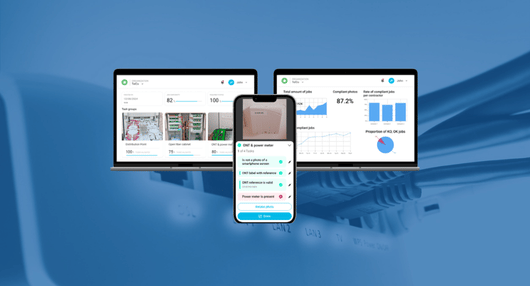
Only 10% to 15% of fiber customer installations are verified today. Undetected defects, manual data entry errors and incomplete documentation mean up to 20% of installs fail at service activation, triggering costly truck rolls, delaying revenue and risking day-one churn. The Service Activation Agent validates 100% of installations automatically at the point of work, catching issues on-site before the technician leaves. 

The agent also processes your existing installation photo library from day one, delivering immediate value without waiting for new field captures. 
IQGeo-Service-Activation-Agent


The Service Activation Challenges Holding You Back

Low validation coverage leaves most installs unchecked before activation

Defects discovered at activation trigger truck rolls and delay revenue

Manual proof-of-work processes slow contractor closeout and payment

The Case for Automated Installation Validation

100% of customer installations validated vs the 10% to 15% verified manually today

Layer 2

Old way

Layer 2 (1)

Best practice

Icon metro-cross
Existing installation photos unused and unanalyzed
Icon awesome-check
Historical installation records analyzed & validated from day one
Icon metro-cross
Manual verification of a small portion of installations
Icon awesome-check
100% of installations automatically verified
Icon metro-cross
Data entry errors from manual field reporting
Icon awesome-check
Automated data capture and form filling
Icon metro-cross
No visibility on contractor work quality
Icon awesome-check
Fair contractor payment based on proof of work
Icon metro-cross
Revisits to correct installation defects
Icon awesome-check
On-site validation prevents activation failures
Layer 2

Old way

Icon metro-cross
Existing installation photos unused and unanalyzed
Icon metro-cross
Manual verification of a small portion of installations
Icon metro-cross
Data entry errors from manual field reporting
Icon metro-cross
No visibility on contractor work quality
Icon metro-cross
Revisits to correct installation defects
Layer 2 (1)

Best practice

Icon awesome-check
Historical installation records analyzed & validated from day one
Icon awesome-check
100% of installations automatically verified
Icon awesome-check
Automated data capture and form filling
Icon awesome-check
Fair contractor payment based on proof of work
Icon awesome-check
On-site validation prevents activation failures

What Service Activation Agent Delivers

Green tick circle icon

100% Installation Coverage

Every customer installation validated, not just the 10% to 15% reviewed today

Green tick circle icon

Real-Time On-Site Validation

Issues caught before the technician leaves the customer premises

Green tick circle icon

Equipment and Quality Checks

Validate correct equipment, installation standard and configuration

Green tick circle icon

Automatic Proof of Work

Structured, auditable evidence captured and stored for every job

Green tick circle icon

Contractor Payment Verification

Link payment to verified proof of completed, conforming work

Green tick circle icon

Right-First-Time Activation

Reduce truck rolls and day-one churn through earlier defect detection

IQGeo Service Activation FAQs

What does the IQGeo Service Activation Agent do?

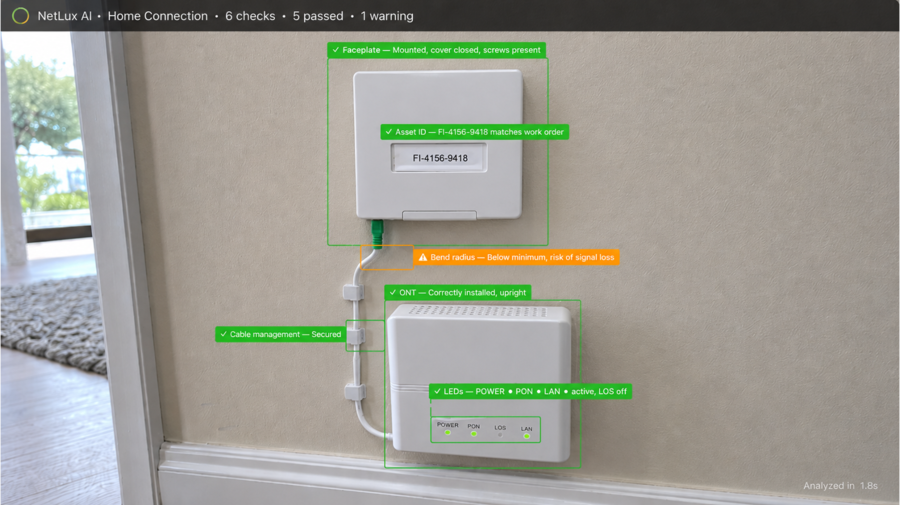
The Service Activation Agent validates installation readiness before a customer is connected. It analyzes photos captured during the activation visit, verifies that all installation requirements are met and flags issues for correction before the technician leaves the premises. 

How does it improve right-first-time activation rates?

By automatically checking 100% of activation photos against defined quality standards, the agent catches installation errors that would otherwise cause a failed activation or early service fault. Issues are identified and corrected on site before the customer is connected. 

What happens when the agent flags an issue?

The technician receives immediate feedback through their field application. They can correct the issue on site and resubmit the photo for re-validation before completing the job. The corrected result is recorded in the work order. 

What data does it capture automatically?

The agent extracts and records ONT and gateway serial numbers, MAC addresses, equipment make and model, installation compliance status and photo evidence, automatically populating work order fields and reducing manual data entry.

How does it integrate with our activation workflow?

The agent integrates with existing field applications via API and connects natively with IQGeo Lens and IQGeo Workflow Manager. It is designed to fit into the activation process without changing how technicians work.

Is this relevant if we already have a photo requirement in our activation process?

Yes. Requiring photos and validating them are different capabilities. Most operators require installation photos today but review only a small sample manually. The agent validates every photo automatically at the moment of capture, not as a back-office sample check. 

Ready to Activate Right First Time, Every Time?

 IQGeo's Service Activation Agent validates 100% of customer installations automatically.

Catch defects on-site. Accelerate closeout. Reduce truck rolls.

Relevant Resources

Background image showing network infrastructure showing ethernet cable connections on a router. In the middle is the
White open book outline icon

Service Activation Agent Overview Sheet

Outline in white of an open book

The Hidden Problem with Field Data Quality in Telecom and Utility Networks

Outline in white of a play button icon

When Visual AI Becomes a Daily Companion for Field Engineers

Outline in white of a play button icon

See How Operators Are Scaling Operations With AI